












AI receptionist & enrollment automation for tutoring centers and schools

Your teachers are in class.
Parents still get answered.

  • Parent calls go to voicemail
  • Trial lessons never get booked
  • Enrollment forms sit half-finished

CodeBold builds tutoring center automation for tutoring centers, test-prep companies, music and language schools and private school admissions offices: an AI receptionist for tutoring centers and schools that answers parent inquiries day and night, books tours and trial lessons, sends lesson reminders, chases enrollment forms and tuition, and sends progress updates your teachers approved. One process that runs on its own.

See what it does
  • Free first call
  • It says it is an AI
  • Speaks with parents, not children
A tutoring center front desk with nobody behind it
Teaching until 6 pmFront desk unattended
AI receptionistAnswering now

My son needs help with algebra. Do you have openings?

I'm the center's AI assistant. We do. Can I book an assessment?

Booked · Sat 10:00 am

— The flows

This is what a finished front desk looks like.

The actual chain, end to end. Pick the kind of school closest to yours. What we build for you will be shaped around how your school already runs.

Pick your kind of school 4

Also built for Language schools · Coding & STEM classes · Driving schools · Dance studios · Art studios · Swim schools · After-school programs · College admissions coaching

01 Tutoring centers 5 steps · 4 run on their own · 1 waits for you

The parent who calls at night still gets a booking

Parents look for help in the evening, after homework has gone wrong. This answers first.

  1. A mother at home in the evening, calling a tutoring center on her phone

    AI voice call

    The inquiry is answered

    Calls, chats and emails, evenings and weekends included.

  2. A front desk coordinator on the phone while a father waits at the desk

    AI voice call

    Your questions, in order

    Grade, subject, schedule and goals, asked of the parent. No promises about grades.

  3. A tutor smiling as he works through a problem with a student

    Calendar

    Assessment booked

    With a tutor who teaches that subject and level, confirmed by text and email.

  4. A young mother completing an enrollment form on a laptop at her kitchen table

    Your team

    Your team sets the plan

    A person reviews the assessment and agrees the program with the family.

    This one waits for your team

  5. A grandmother smiling at a progress update on her phone

    Text

    Reminds before every session

    The day before, with a new time offered if a session is missed.

  6. The result

    What your customer actually gets

    The worried parent at nine at night gets a booking, not a voicemail.

    AI receptionist8:50 pm · after hours

    ThemMy son's math grades have slipped this term. Can you help?

    AII'm the center's AI assistant. A tutor can see where he is first. Which grade is he in?

    ThemSeventh. Weekday evenings work best.

    AIThursday at 5:00 pm is open for an assessment. I'll text you the details.

    Assessment booked · Thu 5:00 pm · parent confirmed

    The worried parent at nine at night gets a booking, not a voicemail.

And it keeps running

The morning summary lists every new inquiry, every assessment booked, and what needs a person.

Your own process

Not the flow you were looking for?

Tell us what your team repeats every week. We'll map it and come back to you within one working day. The map is free, and it's yours either way.

  1. You tell us
  2. We map it
  3. The map is yours

— Sound familiar?

Your teachers cannot be in class and on the phone.

These happen every week at a busy school, and each one can cost you a family.

A tutoring center reception with nobody at the desk
Missed callEvery teacher is in class

Everyone is teaching

The classrooms are full. The phone is ringing.

A dark, empty tutoring center at night
Website inquiry · 9:15 pmUnread until tomorrow

Parents ask after bedtime

Questions come in at night. Answers go out the next afternoon.

A front desk stacked with unfinished registration forms
Enrollment formStarted, never finished

Enrollment that never finishes

Half a form, no emergency contact, no follow-up.

An empty chair at a tutoring table with an open workbook
Lesson · 4:30 pmStudent didn't come

The lesson nobody came to

Booked weeks ago. Nobody reminded the family.

Unopened envelopes and a blank statement on an office desk
Tuition · this monthNot paid yet

Tuition nobody chased

The invoice went out. The reminder didn't.

A front desk coordinator on the phone while a father waits at the desk
Phone ringingA parent is at the desk

One person, every question

Pickups, payments and phone calls all want the same person.

Every one of these can run without waiting for a free pair of hands.

See how each one is fixed

— Where it fits

Across the whole school year.

  1. Before they enroll

    Parent inquiries answered, then tours, trial lessons and assessments booked.

  2. Once they sign up

    Enrollment forms chased, tuition reminders on schedule, a reminder before every lesson.

  3. All year long

    Missed lessons rescheduled, progress updates your teachers approved, and next term's re-enrollment.

— What it does

Everything the front desk does, done on time.

A mother at home in the evening, calling a tutoring center on her phone
AI receptionistOn your center's number

My daughter is struggling with chemistry. Can you help?

I'm the center's AI assistant. We tutor chemistry. Which grade is she in?

Tenth grade. Evenings are best for us.

Tuesday at 6:00 pm is open for an assessment. I'll text you.

Inquiry answered · Tue 6:00 pm

Parent inquiries

Answers every parent, day and night.

An AI receptionist for your tutoring center or school, on your own number, website chat and email. It says it is an AI, answers parents' questions about programs, schedules and fees from what you give it, and speaks with parents and guardians, not children.

  • Picks up when the desk is busy or closed
  • Phone, website chat and email
  • Answers from your own programs and fees
  • Hands anything urgent to a person
A tutor smiling as he works through a problem with a student
Saturday's first visitsOne seat refilled
  • 9:00Reading assessment
  • 10:30Math trial lessonCancelled, then offered to the waitlist
  • 1:00Center tour

Tours, trials & waitlists

Books the first visit, and fills the gaps.

Trial lessons, assessments and school tours booked into the right teacher's calendar. When a class is full, families join your class waitlist, and the next one hears when a seat opens.

  • Trial lessons, assessments and tours
  • Matches the subject and level to the right teacher
  • Keeps the waitlist in order
  • Confirms by text and email straight away
A father in his parked car smiling at a text message
Lesson reminderSent the day before

Hi Andre, a reminder of Jayden's math session tomorrow at 4:30 pm.3:30 pm

He has a game tomorrow. Can we move it?3:41 pm ✓✓

Thursday at 4:30 pm is open with Ms. Carter. Booked.3:41 pm

Lesson reminders

Reminds every family, rebooks the missed ones.

Lesson reminders and class reminders go out the day before, and a family who can't make it picks a new time by text. A missed session gets a make-up lesson offer instead of a gap.

  • The day before, or the week before for tours
  • Reschedules by text into your open slots
  • Follows up after a missed session
  • Tells you who didn't reply
A young mother completing an enrollment form on a laptop at her kitchen table
Enrollment formChased for your front desk
  1. Registration form sent9:05 am
  2. Medical form chasedWed 9:00 am
  3. Form completeWed 7:40 pm

Enrollment & tuition

Gets the forms finished and the tuition in.

Enrollment forms and registration packets chased until they are complete, and tuition reminders that go out politely, on your schedule, with the payment link from your own billing system.

  • Your forms and checklist for each program
  • Reminders until every form is complete
  • Tuition and payment reminders in your words
  • Tells you who hasn't paid or replied
A grandmother smiling at a progress update on her phone
Progress updateApproved by the teacher

Update from Ms. Carter: Maya finished her fractions unit this week and starts decimals next.4:10 pm

Wonderful, thank you!4:22 pm ✓✓

Spring sign-up opens Monday. Shall I hold her Tuesday spot?4:22 pm

Progress & next term

Keeps parents updated, and back next term.

Progress updates go out only once the teacher writes or approves them, by text or email. Before the term ends, re-enrollment reminders ask each family whether to keep their spot.

  • Written or approved by the teacher
  • By text or email, as the parent prefers
  • Re-enrollment reminders before next term
  • Questions passed to the right person
A center director working at a computer in a tutoring center office
  1. Inquiry
  2. Roster
  3. Calendar
Calendar step failedStaff told straight away

Your software

Fits what you already run.

Your tutoring management software or student information system (Teachworks, TutorBird, My Music Staff, Jackrabbit, Blackbaud and others, wherever they allow a connection), plus your calendar and email. Student records stay where they are. Where there is nothing to connect to, a browser agent logs in with your account and does the clicking.

  • Your student or admissions software
  • Your calendar and email
  • Online forms and payment links
  • Tells you when a step fails

Which of these would take the most off your front desk?

Chat on WhatsApp

— More than the front desk

Need more than automation? We build that too.

Can parents find you online?

We build or rebuild your tutoring center website so Google and AI assistants like ChatGPT can find and read it.

  • Your programs, teachers and schedules clear on every page
  • Built so Google can read it properly
  • Readable by AI assistants like ChatGPT

Free Your new home page, designed first. Need a new website or a redesign? We'll design your home page for free. If you like it, we carry on.

Need to change something on your website?

Do it yourself, in plain words. Type the change the way you'd say it, check it, preview it and publish. No developer, no waiting.

  1. Open the editor. Your pages, photos and changes on one screen.
  2. Type your change. “Change our Saturday hours to 9 to 2.” Plain words, no forms.
  3. Check it. See what changed, and what didn’t. Undo anytime.
  4. Preview it. A private preview, exactly as customers will see it.
  5. Publish. It’s live, usually in 1 to 2 minutes.

Want it all on your phone?

Your lessons, trials and approvals in an app for Android and iPhone.

  • For Android and iPhone
  • Lessons, trials and approvals in one place
  • An app for your teachers, your families, or both

Is your website slow?

A slow page can lose a family before they call. We find what's slowing it and fix it.

  • We find exactly what is slowing it down
  • Images, code and hosting fixed
  • Checked on phones as well as computers

Not sure where to start?

Tell us how your school runs. We'll point you to the one that helps most, or tell you it's fine as it is.

— What it plugs into

It works with what you already use.

A flow is only useful if it reaches the tools your team lives in. Where a product offers a connection, we use it. Where it doesn’t, the browser agent signs in and does the clicking, the same way your team does.

  • WhatsApp Business
  • Telegram
  • Gmail
  • Google Meet
  • Zoom
  • Messenger
  • Google Calendar
  • Google Sheets
  • Google Docs
  • Google Drive
  • Google Forms
  • Dropbox
  • Notion
  • HubSpot
  • Zoho
  • Airtable
  • Trello
  • Asana
  • ClickUp
  • Calendly
  • Shopify
  • WooCommerce
  • BigCommerce
  • Wix
  • Squarespace
  • WordPress
  • Webflow
  • Razorpay
  • Stripe
  • PayPal
  • Paytm
  • PhonePe
  • Zendesk
  • Intercom
  • Mailchimp
  • Typeform
  • Zapier
  • n8n
  • Your own phone line
  • Any portal you log into

…and the ones that aren’t here. If a tool offers no connection at all, the browser agent signs in with your account and works it the way a person would, which is how portals, job boards and supplier sites get covered. Tell us what you run on the call.

— The building blocks

The parts we build your flow from.

Every flow on this page is assembled from these. Yours will use some of them, in an order nobody else has.

An AI receptionist on your own line

Answers and makes real calls in the caller's language, answers parents' questions from your own programs, books the trial or tour and writes the call up for your team. It says it is an AI, and it never promises grades, scores or a place.
Browser agent for the portals

Older student software, admissions portals and online forms: it logs in with your own account and does the clicking where there is nothing to connect to.

Text, email & website chat

Lessons, trials & tours

Parents and guardians only

Teacher approval before updates go out

Enrollment forms & tuition reminders

Student software & spreadsheets

  • Multi-language
  • Your school's name and voice
  • Never promises grades or places
  • Wellbeing concerns go to a person
  • Every call and message logged
  • Tested before a parent hears it

— Why build it this way

Where the other two stop.

Doing it by handYour student softwareA CodeBold flow
Answers parent inquiries after hours No Voicemail No Yes 24/7
Books trial lessons, assessments and tours Yes If someone is free A booking page Yes On the call or chat
Reminds families before every lesson When there is time If configured Yes Always
Rebooks missed lessons Phone tag If someone does it Yes By text
Chases enrollment forms and tuition Rarely A list to work through Yes Until they're done
Offers open seats to the waitlist If someone remembers Varies Yes In order
Waits for the teacher's approval before updates go out Yes Varies Yes Built in
Tells you when a step fails No A parent tells you If configured Yes Alerts a person

The first two are fine for a step. A process that spans a browser, a phone call and a calendar needs something that can carry it all the way through.

Want your front desk to work like this?

One free call. We'll map your front desk with you and tell you honestly whether it's worth automating.

Chat on WhatsApp

— What it costs

Pay for the work, not per seat.

Four parts, each agreed before it starts. Nothing is billed by the hour, and your whole team can use it at no extra cost per person.

  1. Free Before anything

    We map your process

    A 30-minute call, then a written plan of your flow. Yours to keep, even if you say no.

  2. One price Once, to build it

    We build and test it

    One fixed price for the plan you approved, agreed before work starts. Nobody is contacted until you sign it off.

  3. Monthly While it runs

    We keep it running

    Hosting, daily checks, an alert when a step fails, fixes, and changes as you grow.

  4. At cost As you use it

    Calls and texts

    Charged by the phone company and passed on with no markup, on their own line.

Calls and texts are billed by the phone company and shown on their own line of your quote, at cost.

— Trust & responsible AI

Your families, your school, your rules.

It says it is an AI

On every call, chat and email. We will not build one that pretends to be a person.

Parents and guardians, not children

It never contacts a child. It messages adult students only where your school has set that up.

No promises about results

It never promises grades, test scores or admission. Those belong to your teachers and your admissions team.

Concerns go to a person

A safeguarding or wellbeing concern, or anything urgent, is handed straight to a person on your team.

No cold calls

It only contacts families who contacted you, and your current families.

Teachers approve every update

Progress updates go out only after the teacher writes or approves them, and every message is logged.

— Questions school directors ask

Questions directors ask.

Yes. It introduces itself as your school's AI assistant at the start of every call, chat and email conversation. That is honest, and in a growing number of places it is also required.

It speaks with parents and guardians. It never contacts a child directly. Adult students, such as a grown-up taking music or language lessons, are messaged only where your school has set that up. If a young student calls or chats, it asks for a parent or guardian to get in touch and lets your team know.

No, and we will not build one that does. It answers from the programs, schedules and fees you give it. It never promises a grade, a test score or admission. Questions about how a student is doing go to the teacher, and every admissions decision is made by your admissions team.

A safeguarding or wellbeing concern, or anything you define as urgent, is handed straight to a person on your team. It does not try to judge how serious it is or deal with it itself. The handover is logged so nothing is lost.

Your teachers. A progress update goes out only after the teacher has written or approved it. The flow delivers it by text or email and passes any reply back to the right person.

Only families who contacted you, and your current families. It never cold-calls, cold-texts or cold-emails anyone. Waitlist and re-enrollment messages go only to families already on your list, and anyone who asks to stop is not contacted again.

Student information stays in the systems you already use, in a workspace of your own, and we do not reuse or sell anything that passes through it. We hold no certification or compliance standard and will not imply otherwise. Bring your school's privacy policy and any rules you follow, such as FERPA, to the mapping call, and we will either build to them or tell you honestly that we cannot.

It works with your calendar and email, imports Excel and CSV, and connects to your student or admissions software (Teachworks, TutorBird, My Music Staff, Jackrabbit, Blackbaud and others) wherever it allows a connection. None of them is a partner of ours. Where there is nothing to connect to, the browser agent logs in with your account and does the clicking.

It sends tuition and payment reminders with the payment link from your own billing system. The payment itself goes through that system, never through the conversation.

Many answering services take a message for someone to call back. This flow answers parents' questions from your own programs, books the trial lesson, assessment or tour in the right calendar and confirms it by text, then writes the call up for your team. Anything it should not handle still goes to a person.

Yes. It can answer and message in Spanish and other languages, and your team can get the write-up in English.

There is no fixed plan, because every school's front desk is different. The mapping call and written plan are free, building it is one fixed price agreed before work starts, running it is a monthly fee, and calls and texts are passed through at cost. You have the full figure before you sign.

This page shows worked flows for tutoring centers, test prep, music and arts schools, and private school admissions. We also build for language schools, coding and STEM classes, driving schools, dance, art and swim schools, after-school programs and college admissions coaching.

You do. The flow, the scripts, the rules and the data are yours, and they stay in your own workspace.

— The AI behind it

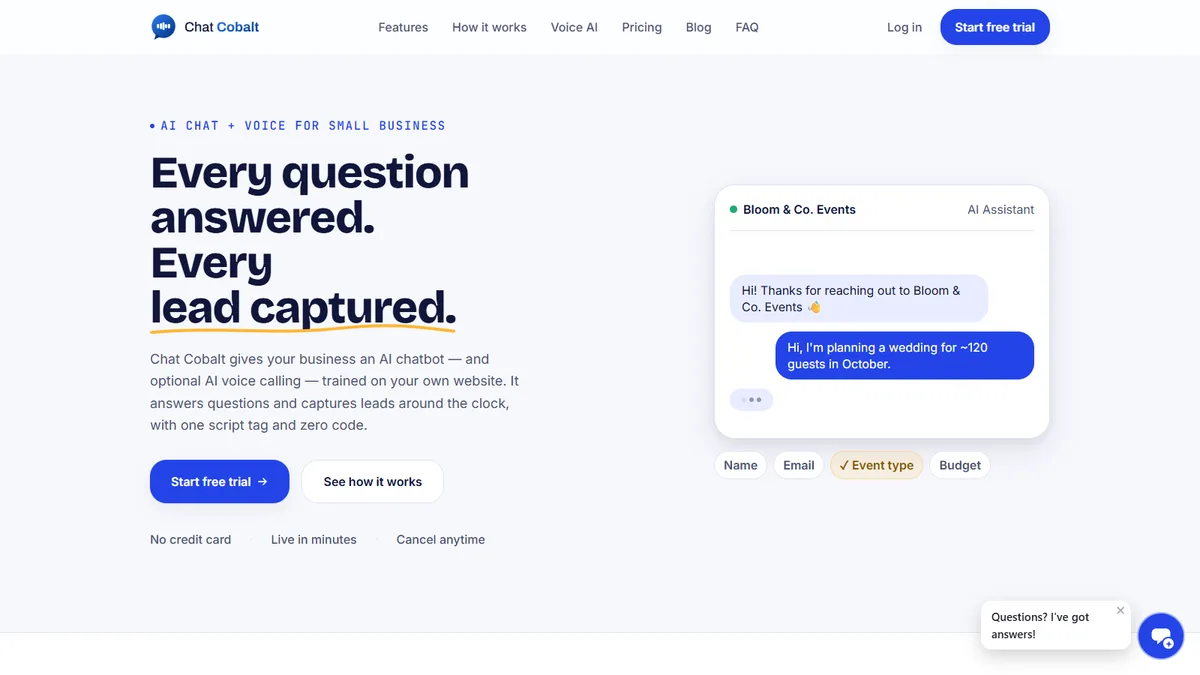
Your AI receptionist runs on Chat Cobalt.

Chat Cobalt is Codebold's own AI chat and voice product. It answers your website chat and your phone, trained on your school's own website, and hands the flows on this page what they need: the booking, the reminder, the follow-up.

  • AI chat on your website, day and night
  • AI voice on your own phone number
  • Reply to chats and see new leads in the app

We run Chat Cobalt on our own business every day.

The Chat Cobalt website, with its AI chat answering an enquiry

— Let's talk

Tell us what your
front desk repeats.

One free call. We'll map it with you and tell you honestly whether it's worth automating.

Chat on WhatsApp

Working with clients internationally, since 2013.