













AI receptionist & RFQ automation for manufacturers

Your team is on the shop floor.
Every RFQ still gets answered.

  • RFQs wait in the inbox
  • Quotes go out, nobody follows up
  • Customers call for ship dates

CodeBold builds manufacturing sales automation for industrial parts, custom fabrication, packaging and food production companies: an AI receptionist for manufacturers that takes inquiries and RFQs with the details your estimator needs, quotes followed up, order status answered from your own ERP, reorder reminders to your customers and overdue invoices chased. Your estimators price and your sales team commits. One process that runs on its own.

See what it does
  • Free first call
  • It says it is an AI
  • Never prices a job
An inside-sales desk at a manufacturer with nobody behind it
On the shop floor until 3 pmSales desk unattended
AI receptionistAnswering now

Can you quote some stainless brackets? I have drawings.

I'm the sales team's AI assistant. I'll take the details for the estimator.

RFQ logged · drawings attached

— The flows

This is what a finished sales desk looks like.

The actual chain, end to end. Pick the industry closest to yours. What we build for you will be shaped around how your company already sells.

Pick your industry 4

Also built for Machine shops · Metal stamping · Plastics & injection molding · Electronics assembly · Woodworking & millwork · Chemicals & coatings · Printing & labels · Building products

01 Industrial parts 5 steps · 4 run on their own · 1 waits for you

The RFQ at nine at night is complete by morning

Buyers send RFQs when they have time, often after hours, and often to more than one supplier.

  1. A purchasing manager calling a supplier from his office

    AI voice call

    The inquiry is answered

    Calls, website forms and the sales inbox, evenings and weekends included.

  2. An inside-sales rep on the phone while a production lead waits at the desk

    AI voice call

    The details your estimator needs

    Part, quantity, material, finish, due date and the drawing. No price is given.

  3. A sales manager working at a computer in a manufacturer's office

    CRM

    Logged with the drawings

    Filed to the customer, drawings attached, ready for the estimator.

  4. A small-business owner smiling at an email on her laptop in her stockroom

    Your team

    Your estimator prices it

    Price and lead time come from your estimator. The flow never quotes.

    This one waits for your team

  5. A distributor's warehouse manager reading a text on her phone

    Email

    The quote is followed up

    On the schedule you set, with every reply sent back to the estimator.

  6. The result

    What your customer actually gets

    The RFQ at nine at night is on the estimator's desk, complete, in the morning.

    AI receptionist9:15 pm · after hours

    ThemI need a quote on aluminum spacers. Same as our last order, but a new length.

    AII'm the sales team's AI assistant. I can't give a price, but I'll take the details for the estimator.

    ThemFive hundred pieces, needed by the end of next month. I'll send the drawing.

    AIThank you. I'll text you a link for the drawing, and the estimator will have it all in the morning.

    RFQ logged · drawing attached · estimator alerted

    The RFQ at nine at night is on the estimator's desk, complete, in the morning.

And it keeps running

The daily sales report lists every new RFQ, every quote out, and which buyers replied.

Your own process

Not the flow you were looking for?

Tell us what your team repeats every week. We'll map it and come back to you within one working day. The map is free, and it's yours either way.

  1. You tell us
  2. We map it
  3. The map is yours

— Sound familiar?

Your team cannot be on the floor and on the phone.

These happen every week at a busy plant, and each one can cost you an order.

An inside-sales office at a manufacturer with nobody at the desk
Missed callEveryone is on the floor

The sales desk is on the floor

A job needs everyone. The phone still rings.

A dark, empty manufacturing office at night, the plant floor beyond the window
RFQ by email · 9:15 pmUnread until morning

RFQs arrive after the office closes

The buyer sent it to three suppliers. The first to answer has the edge.

An estimator's desk with printed technical drawings, a machined part and a coffee mug
Quote sent MondayNo follow-up yet

Quotes that go quiet

The estimator sent it. Nobody asked the buyer what they thought.

A purchasing manager in a distributor's warehouse office, on the phone
Customer callingAsking for a ship date

“When does my order ship?”

The same question, from every customer, every week.

A quiet loading dock with wrapped pallets waiting by an open dock door
Usual reorder · overdueNobody has called them

Reorders nobody prompted

A regular customer usually orders by now. This month, they haven't.

An inside-sales rep on the phone while a production lead waits at the desk
Phone ringingRep already on a call

One rep, three jobs

RFQs, order status and the production meeting all want the same person.

Every one of these can run without waiting for a free pair of hands.

See how each one is fixed

— Where it fits

Across the whole customer order.

  1. Before the quote

    Inquiries and RFQs taken day and night, with the part, quantity, material, drawings and due date.

  2. Once the quote is out

    Quote follow-up on your schedule, sample requests to the rep, technical questions to your team.

  3. While they keep buying

    Order status from your ERP, reorder reminders, overdue invoice reminders and a daily sales report.

— What it does

Everything the front desk does, done on time.

A purchasing manager calling a supplier from his office
AI receptionistOn your sales line

I need a quote on aluminum spacers, five hundred pieces.

I'm the sales team's AI assistant. I can't price it, but I'll take the details for the estimator.

Fine. I need them by the end of next month.

Noted. I'll text you a link to upload the drawing.

RFQ logged · drawing requested

Inquiries & RFQs

Takes every RFQ, day and night.

An AI receptionist for manufacturers, on your own number, website chat and sales inbox. It says it is an AI, takes the part, quantity, material, drawings and due date, and hands a complete RFQ to your estimator. It never gives a price.

  • Picks up when the desk is busy or closed
  • Part, quantity, material, drawings and due date
  • Web forms and emails answered the same evening
  • Never prices a job or promises a lead time
An estimator reviewing a printed drawing at her desk
Quote follow-upAfter your estimator sends it
  1. Quote sent by your estimatorMon 9:05 am
  2. Follow-up email to the buyerWed 9:00 am
  3. Buyer replied, sent to the estimatorWed 2:40 pm

Quote follow-up

Follows up every quote, so none go quiet.

Once your estimator sends a quote, quote follow-up goes out on the schedule you set. Replies, revisions and questions go straight back to the estimator or the rep.

  • Starts only after your estimator sends the quote
  • Follow-ups in your words, on your schedule
  • Revision requests sent back with the original quote
  • Won or lost, recorded in your CRM
A distributor's warehouse manager reading a text on her phone
Order statusFrom your own system

When do the brackets on our last PO ship?7:48 am ✓✓

I'm the sales team's AI assistant. Our system shows they ship Thursday.7:48 am

And the gaskets?7:50 am ✓✓

That line has no ship date yet. I've asked Mike to confirm it with you.7:50 am

Order status

Answers “where's my order?” from your own system.

Order status and ship dates come straight from your ERP. When your system has no date, it says so and passes the question to your team. It never guesses.

  • Ship dates only from your own system
  • Says when it doesn't know
  • By phone, text or email
  • Open questions sent to the right rep
A small-business owner smiling at an email on her laptop in her stockroom
Reorders this monthSent to your customers
  • Shipping cartons · usual reorderReordered
  • Machined bushings · dueReminded
  • Shrink film · dueReminded
  • Gaskets · past dueNo reply

Reorders & invoices

The reorder arrives before they run low.

Reorder reminders to your existing customers, timed on how they usually buy. Overdue invoice reminders go out politely, with your own payment link. Your rep confirms every order.

  • Timed from each customer's order history
  • Only to existing customers
  • Your rep confirms every order
  • Tells you who didn't reply
A sales rep talking with a visitor at a plain trade-show booth
Trade-show follow-upTo people who left their details

Hi Dana, thanks for stopping by our booth on Tuesday. Would samples of the food trays help?9:10 am

Yes please, the two smaller sizes.10:02 am ✓✓

Noted. Chris will confirm and send them to you.10:02 am

Samples & trade shows

Every trade-show lead followed up.

Trade-show leads who left their details and everyone who asked for a sample are followed up on time. Distributor questions go to the rep who handles that account.

  • Only people who gave you their details
  • Sample requests sent to the right rep
  • Distributors routed by account or region
  • A daily sales report every morning
A sales manager working at a computer in a manufacturer's office
New customer, set up for youIn the software you already use
  • Customer added to your ERPDone
  • Contact added to your CRMDone
  • First RFQ filed with its drawingsDone
  • Tax exemption form not attachedStaff told

Your software

Fits what you already run.

Your ERP and CRM (Epicor, JobBOSS, SAP Business One, NetSuite, HubSpot and others, wherever they allow a connection), your email and shared drives. Where there is nothing to connect to, a browser agent logs in with your account and does the clicking.

  • Your ERP and CRM
  • Your email and shared drives
  • Drawings filed to the right customer
  • Tells you when a step fails

Which of these would take the most off your front desk?

Chat on WhatsApp

— More than the front desk

Need more than automation? We build that too.

Can buyers find you online?

We build or rebuild your manufacturer website so Google and AI assistants like ChatGPT can find and read it.

  • Your capabilities, materials and industries clear on every page
  • Built so Google can read it properly
  • Readable by AI assistants like ChatGPT

Free Your new home page, designed first. Need a new website or a redesign? We'll design your home page for free. If you like it, we carry on.

Need to change something on your website?

Do it yourself, in plain words. Type the change the way you'd say it, check it, preview it and publish. No developer, no waiting.

  1. Open the editor. Your pages, photos and changes on one screen.
  2. Type your change. “Change our Saturday hours to 9 to 2.” Plain words, no forms.
  3. Check it. See what changed, and what didn’t. Undo anytime.
  4. Preview it. A private preview, exactly as customers will see it.
  5. Publish. It’s live, usually in 1 to 2 minutes.

Want it all on your phone?

Your RFQs, quotes and orders in an app for Android and iPhone.

  • For Android and iPhone
  • RFQs, quotes and order questions in one place
  • An app for your team, your customers, or both

Is your website slow?

A slow page can lose a buyer before they send an RFQ. We find what's slowing it and fix it.

  • We find exactly what is slowing it down
  • Images, code and hosting fixed
  • Checked on phones as well as computers

Not sure where to start?

Tell us how your sales desk runs. We'll point you to the one that helps most, or tell you it's fine as it is.

— What it plugs into

It works with what you already use.

A flow is only useful if it reaches the tools your team lives in. Where a product offers a connection, we use it. Where it doesn’t, the browser agent signs in and does the clicking, the same way your team does.

  • WhatsApp Business
  • Telegram
  • Gmail
  • Google Meet
  • Zoom
  • Messenger
  • Google Calendar
  • Google Sheets
  • Google Docs
  • Google Drive
  • Google Forms
  • Dropbox
  • Notion
  • HubSpot
  • Zoho
  • Airtable
  • Trello
  • Asana
  • ClickUp
  • Calendly
  • Shopify
  • WooCommerce
  • BigCommerce
  • Wix
  • Squarespace
  • WordPress
  • Webflow
  • Razorpay
  • Stripe
  • PayPal
  • Paytm
  • PhonePe
  • Zendesk
  • Intercom
  • Mailchimp
  • Typeform
  • Zapier
  • n8n
  • Your own phone line
  • Any portal you log into

…and the ones that aren’t here. If a tool offers no connection at all, the browser agent signs in with your account and works it the way a person would, which is how portals, job boards and supplier sites get covered. Tell us what you run on the call.

— The building blocks

The parts we build your flow from.

Every flow on this page is assembled from these. Yours will use some of them, in an order nobody else has.

An AI receptionist on your sales line

Answers and makes real calls in the caller's language, takes RFQs with the details your estimator needs, answers order status from your own system and writes the call up for your team. It says it is an AI, and it never prices a job or commits to a lead time.
Browser agent for the older systems

Older ERP screens, distributor portals and online forms: it logs in with your own account and does the clicking where there is nothing to connect to.

Text, email & website chat

RFQs with drawings attached

Quote follow-up & reorder reminders

Your estimator prices every job

Quality issues go to a person

ERP, CRM & spreadsheets

  • Multi-language
  • Your company's name and voice
  • Never prices a job
  • Technical questions go to a person
  • Every call and message logged
  • Tested before a customer hears it

— Why build it this way

Where the other two stop.

Doing it by handYour ERP or CRMA CodeBold flow
Answers inquiries and RFQs after hours No Voicemail No Yes 24/7
Takes the part, quantity, material, drawings and due date Yes If someone is free A form to fill in Yes On the call, chat or email
Follows up every quote the estimator sends When there is time A task to work through Yes On your schedule
Answers order status and ship dates Someone looks it up A portal, if you have one Yes From your own system
Reminds customers when a reorder is due Rarely A report to work through Yes From order history
Sends overdue invoice reminders When someone remembers If configured Yes On your schedule
Tells you when a step fails No The customer tells you If configured Yes Alerts a person

The first two are fine for a step. A process that spans a browser, a phone call and a calendar needs something that can carry it all the way through.

Want your sales desk to work like this?

One free call. We'll map your sales desk with you and tell you honestly whether it's worth automating.

Chat on WhatsApp

— What it costs

Pay for the work, not per seat.

Four parts, each agreed before it starts. Nothing is billed by the hour, and your whole team can use it at no extra cost per person.

  1. Free Before anything

    We map your process

    A 30-minute call, then a written plan of your flow. Yours to keep, even if you say no.

  2. One price Once, to build it

    We build and test it

    One fixed price for the plan you approved, agreed before work starts. Nobody is contacted until you sign it off.

  3. Monthly While it runs

    We keep it running

    Hosting, daily checks, an alert when a step fails, fixes, and changes as you grow.

  4. At cost As you use it

    Calls and texts

    Charged by the phone company and passed on with no markup, on their own line.

Calls and texts are billed by the phone company and shown on their own line of your quote, at cost.

— Trust & responsible AI

Your customers, your company, your rules.

It says it is an AI

On every call, chat, text and email. We will not build one that pretends to be a person.

Your team prices and commits

It never prices a job, commits to a lead time or accepts an order. It tells the buyer your estimator or sales team will.

Hard questions go to a person

Technical and engineering questions, quality complaints, returns and anything urgent go to your team. You define what counts as urgent.

Ship dates from your system

Only the dates your own system shows. When it has no date, it says it doesn't know and asks your team.

No cold calls

It only contacts your customers, your distributors and people who contacted you. Trade-show leads only if they left their details.

No card numbers

It never takes a card number by phone, text or chat. Invoices are paid through your own payment link.

— Questions manufacturers ask

Questions manufacturers ask.

Yes. It introduces itself as your sales team's AI assistant at the start of every call, chat, text and email conversation. That is honest, and in a growing number of places it is also required.

No, and we will not build one that does. It never prices a job, commits to a lead time or accepts an order, and it tells the buyer that your estimator or sales team will. It takes down the details your estimator needs and follows up once the quote has been sent.

Only from your own system: your ERP, or the spreadsheet your team keeps up to date. If an order has no ship date there, it says it doesn't know and passes the question to the right person. It never guesses a date.

They go to a person. Engineering and technical questions are written up for the right engineer or rep. Quality complaints and returns go straight to your team, with the customer and the order attached. You define what else counts as urgent, and those go to a person too.

Only your existing customers, your distributors and people who contacted you. Trade-show leads are followed up only if they gave you their details. It never cold-calls, cold-texts or cold-emails anyone, and anyone who asks to stop is not contacted again.

It never takes a card number by phone, text or chat. Overdue invoice reminders carry your own payment link, and anything beyond a reminder goes to your accounts team.

It works with your email and calendar, imports Excel and CSV, and connects to your ERP and CRM (Epicor, JobBOSS, SAP Business One, NetSuite, HubSpot, Salesforce and others) wherever they allow a connection. Where there is nothing to connect to, the browser agent logs in with your account and does the clicking.

It stays in the systems you already use, in a workspace of your own, and we do not reuse or sell anything that passes through it. We hold no certification or quality standard, ISO or otherwise, and will not imply otherwise. Bring your company's policies and your customers' requirements to the mapping call, and we will either build to them or tell you honestly that we cannot.

Many answering services take a message for someone to call back. This flow takes the RFQ with the details your estimator needs, answers order status from your own system, follows up quotes and reorders, and writes it all up for your team. Anything it should not handle still goes to a person.

Yes. It can answer and message in Spanish and other languages, asking your questions in the customer's language, and your team can get the write-up in English.

There is no fixed plan, because every company's sales desk is different. The mapping call and written plan are free, building it is one fixed price agreed before work starts, running it is a monthly fee, and calls and texts are passed through at cost. You have the full figure before you sign.

This page shows worked flows for industrial parts, custom fabrication, packaging, and food and beverage production. We also build for machine shops, metal stamping, plastics and injection molding, electronics assembly, woodworking and millwork, chemicals and coatings, printing and labels, and building products.

You do. The flow, the scripts, the rules and the data are yours, and they stay in your own workspace.

— The AI behind it

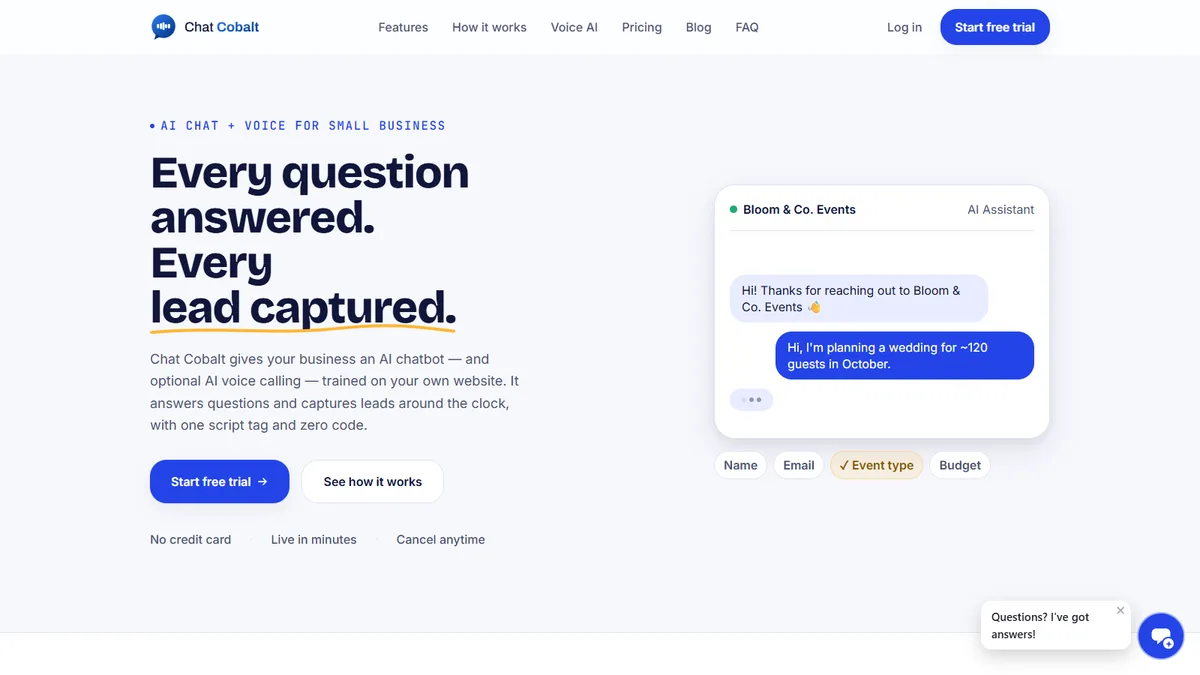
Your AI receptionist runs on Chat Cobalt.

Chat Cobalt is Codebold's own AI chat and voice product. It answers your website chat and your phone, trained on your team's own website, and hands the flows on this page what they need: the booking, the reminder, the follow-up.

  • AI chat on your website, day and night
  • AI voice on your own phone number
  • Reply to chats and see new leads in the app

We run Chat Cobalt on our own business every day.

The Chat Cobalt website, with its AI chat answering an enquiry

— Let's talk

Tell us what your
sales desk repeats.

One free call. We'll map it with you and tell you honestly whether it's worth automating.

Chat on WhatsApp

Working with clients internationally, since 2013.